You wouldn’t keep increasing your search or social budget without asking what it produced. Your streaming TV budget deserves the same scrutiny, and CTV measurement is how you get it. Knowing that your ad ran is a start. It doesn’t tell you whether the ad reached potential customers, brought people to your website or helped generate a sale.
CTV measurement connects ad delivery with business results, so you can decide where your money goes. A useful report shows which publishers are contributing to conversions, whether the same households are seeing your ads too often and what each outcome costs. New to the channel? Start with our guide to CTV advertising.
CTV measurement checks that you got what you paid for: your ad on a television. That isn’t always what happens. You may see this called OTT measurement, but the terms aren’t the same. OTT is video that travels over the internet, instead of through cable, broadcast or satellite, and it can play on any device, including phones and computers. CTV is a television that connects to the internet, which the IAB treats as one part of OTT. Some providers sell inventory as CTV that also runs on phones, tablets and computers. This guide covers what to measure, how to read the return, how to connect ad exposure with website visits, leads and sales, and what to ask your provider so you can judge the results yourself.
The CTV measurement metrics that matter
Traditional TV was spray and pray. You bought a time slot, hoped the right people were watching and got audience estimates built from panels and other viewing data. That’s no longer true. A good CTV report follows households from the ad to what they did next.
Delivery: where, who and when
Where it ran. Every impression should name the publisher and app, and we report down to the publisher and app so you can see which ones ran your ads. Not every report does. Ask for a device breakdown too. Some providers sell inventory as CTV that also runs on phones, tablets and computers, which is a different placement and can carry a different price. If you’re paying CTV prices, your ad should be landing on the big screen.
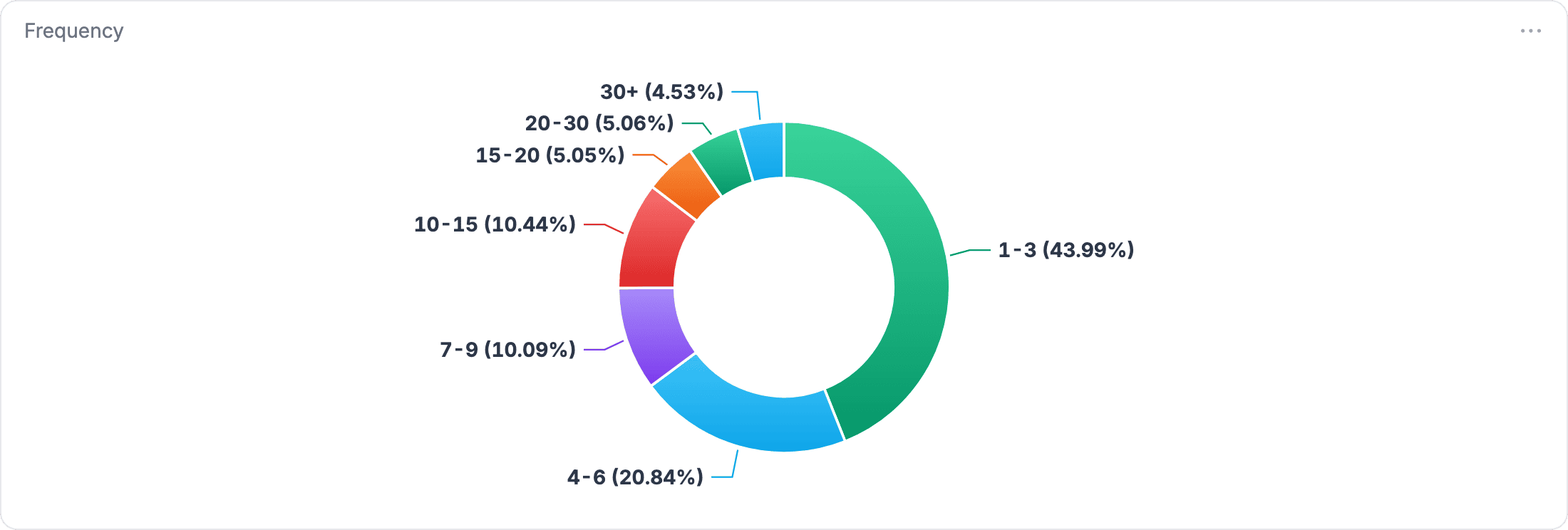
Who saw it and how often. Reach and frequency tell you how many households saw your ad and how many times each one saw it. You know when the same ad plays three times in one commercial break? That’s annoying for the viewer, and for a marketer it’s a huge waste of budget. An average frequency hides it, so ask for frequency in buckets, such as 1 to 3 times and 4 to 6 times. Our post on how to calculate reach and frequency walks through the math.
When it ran. Time of day shows whether your ads ran when your audience was watching.
Results and quality: outcomes, fraud and views
What it led to. Different companies have different goals, so we show you the whole funnel: how many households you reached, how many people landed on your site, and how many filled out a form, called or made a purchase.
What fraud protection stopped. Ad fraud is a real problem in CTV, as it is in other ad tech such as social, and it’s growing: one ad verification firm detected 140% more CTV fraud schemes in Q1 2026 than in Q1 2025. IAB’s Anatomy of a Video Impression report describes fraudsters faking devices and apps to create falsely counted impressions. We don’t rely only on industry-standard protection. Hard Check adds layers on top to protect your budget, and it blocks 250M+ invalid impressions a month.
What counts as a view. Online video has a low bar for a view. The IAB’s viewability standard for digital video asks for half of the ad’s pixels to be in view for 2 continuous seconds, and some social platforms count an impression when the ad appears on screen, whether or not the video plays. Is your message getting through in that time? On a television, the ad plays full screen, viewers generally can’t skip it, and no one can scroll past it.
How to measure TV advertising ROI
TV advertising ROI asks whether a campaign paid for itself. For CTV, the first number to check is return on ad spend, or ROAS: the revenue credited to the campaign divided by the media spend.
Cost per outcome says more than cost per thousand impressions. A CPM tells you what impressions cost. It doesn’t tell you what they produced. Our post on how much a 30-second local TV ad costs makes the same point from the broadcast side.
Here’s an example, with round numbers to show the math and not results from any campaign:
| Example | Number |
|---|---|
| Media spend | $10,000 |
| Form fills credited to the campaign | 100 |
| Cost per form fill | $100 |
| Form fills that become customers | 25 (1 in 4) |
| Value of each customer | $1,000 |
| Revenue credited to the campaign | $25,000 |
| Return on ad spend (ROAS) | 2.5x |
ROAS is the revenue for every dollar of media: $25,000 divided by $10,000 is 2.5, or $2.50 back for every $1 spent. It isn’t profit. For ROI, subtract the other costs of earning that revenue, such as what the product costs you, and divide by the media spend. Your own numbers will differ. Judge the campaign by what a conversion is worth to you, not by how many impressions it delivered.
How TV attribution connects CTV ads to visits and sales
CTV becomes performance TV when the report ties ads to outcomes. TV ads have no click, so you have to connect an ad to an outcome another way. That is what TV attribution does: it connects the households that saw an ad on a television to what happened next.
We place a pixel on your site to record what people do there, such as website visits, form fills (including applications) and purchases. Phone calls and texts come in through our CallRail integration, and we match calls to the TV household by IP address.
Then we meet with you to compare the results with your own sales data. Unlike other platforms, we aren’t trying to take credit for your other marketing. We want to make sure the campaign is hitting your actual objectives.
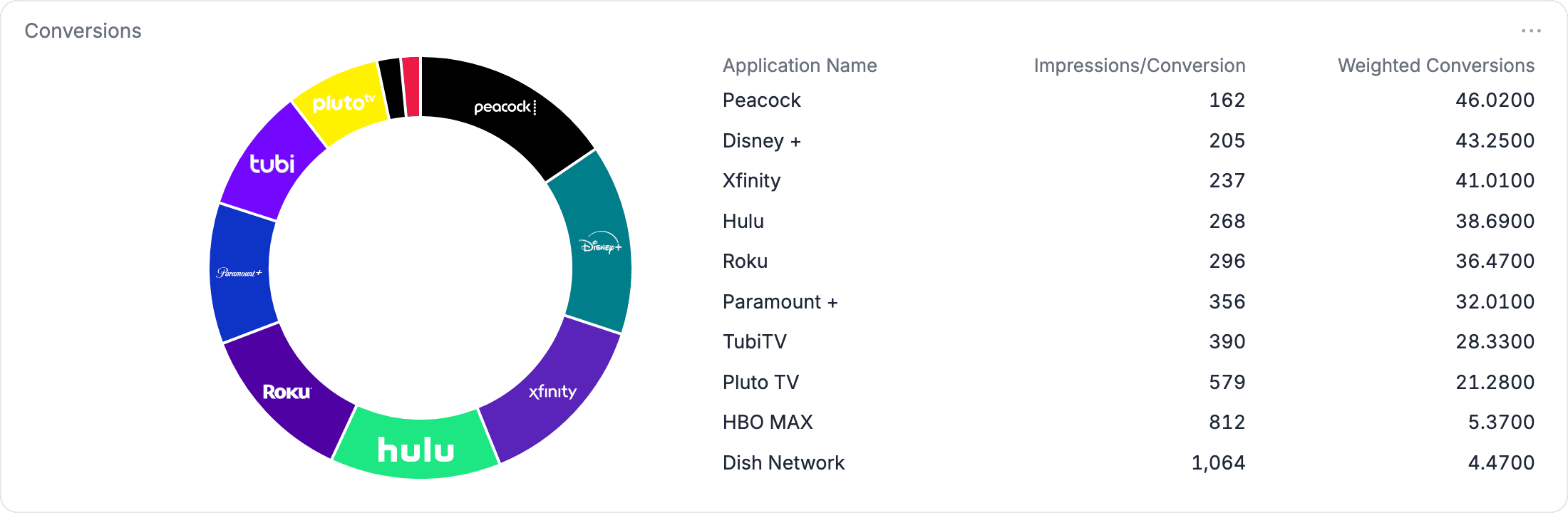
Households that pay for streaming average four services, so the same household can see your ad in more than one app before it buys. Crediting only the last app would misread what happened. We use fractional attribution. We split credit across every streaming publisher that helped, so you see which publishers actually drove the conversions and not only the last app someone watched.
In GammaBurst, our reporting dashboard, the Publishers view shows how many impressions each publisher needed to produce a conversion, and the Conversions view shows weighted conversions by publisher. For the long version, read our post on how OTT ad attribution works.
What you can do with the report
A report earns its keep when it changes a decision:
- If one publisher needs far more impressions per conversion than the others, move budget toward the publishers that convert for less.
- If a large share of households sit in the highest frequency buckets, lower the cap. The same budget then reaches more households.
- If most delivery falls in hours your audience isn’t watching, shift the dayparts.
What to ask your provider about CTV measurement
Five questions turn a report into something you can check. Here is what we say to each.
- Did every impression run on a television, and can I see a device breakdown? Every CTV impression we deliver runs on a real television, and the report names the app. A device breakdown is available if you want to confirm it.
- How is frequency controlled? We cap frequency at the household before the bid, and we can set caps at a daily and weekly level. We dig into the data because different audiences may need different levels of exposure, so we don’t set it and forget it.
- How are conversions tracked and credited? We use a pixel on your site and meet with you to compare results with your sales data, because we aren’t trying to take credit for your other marketing. We split credit across every publisher that helped.
- What protects my budget from fraud? Hard Check layers protection on top of industry-standard tools and blocks 250M+ invalid impressions a month.
- Can I see results while the campaign is running? Yes. You can open GammaBurst for real-time updates on your campaign, and you get a strategist working on your campaigns.
Already running streaming ads? We can review your current campaign data, find the gaps and walk you through what we found on a call. See our streaming spend audit.
Common questions about CTV measurement
What is CTV measurement?
It’s how you check that your ads ran on televisions, who saw them and how often, and what they led to: website visits, form fills, applications, purchases and phone calls.
What’s the difference between CTV and OTT measurement?
OTT is video that travels over the internet, instead of through cable, broadcast or satellite, and it can play on any device, including phones and computers. CTV is a television that connects to the internet, and the IAB treats it as one part of OTT. A CTV report should count only impressions that ran on a TV, so check which screens a report includes before you compare it with an OTT report.
What metrics matter most for CTV?
It depends on your goals, so we show you the whole funnel: households reached, how often they saw your ad, how many people landed on your site, and how many filled out a form, called or made a purchase.
How is a CTV ad view different from an online video view?
For online video, the IAB’s viewability standard asks for half of the ad’s pixels to be in view for 2 continuous seconds. A CTV ad plays full screen and viewers generally can’t skip it.
What’s the difference between ROAS and ROI?
ROAS is the revenue credited to the campaign divided by the media spend. ROI also subtracts the other costs of earning that revenue, such as what the product costs you.
Can you track website visits and sales from CTV?
Yes. We use a pixel on your site to record website visits, form fills such as applications and purchases, and calls and texts come through our CallRail integration. We then compare the results with your sales data. We split credit across the publishers that helped.
How is CTV attribution different from last-click?
Last-click gives all the credit to the final touch. Fractional attribution splits it across every streaming publisher that helped, so you see which publishers drove conversions and not only the last app someone watched.
Want to see what your campaign would report? Tell us who you’re trying to reach and we’ll map it. Book a strategy call.